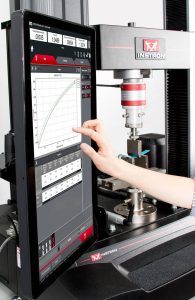
What Does "Touch-friendly" Software Actually Mean?
From a software standpoint, this means making items bigger and implementing gestures; sounds easy! What we’ve done to support the increased sizes for our inputs is to take a step back and try to simplify our workflows and use the available space on the screen in a smarter way. So whether you like to run an application in a portrait or landscape orientation, the Bluehill Universal interface will rearrange itself to use all the available space on the screen. In addition, we’ve implemented gestures, including the options to pinch to zoom on a graph or flick to scroll a menu. Menus can be accessed through what we call a “hamburger”. The hamburger menu allows users to access items, which were less obvious on earlier software versions. To improve the touch experience, we’ve also put these hamburger menus throughout the software to allow users the option to simply click the button to display the menu. These steps, and several others, have made Bluehill Universal a touch-friendly software application.